What does onePoll do?
Building, release, anonymous responses, results and permissions — the way the system does it.
This year and next, the same question.
How deep shall we go?
Same system. Three depths.
Build, release, results.
What the module actually does, in three columns. The surveys module is complete on its own, without e-learning.
Build
- Source questionnaire and surveyThe content is built once; each survey is a release of the same source. The source is not copied, and releases stay comparable year on year.
- Six question typesSingle choice, multiple choice, statements on a scale, rating scale, free text (one or more fields), information block.
- Scale and point set2–10 points with labels beneath; a scale can be saved under a name, and you can see which questions use it.
- Group and categoryEmployees see the question group, and the statistics calculate a group average from it; a category only groups the statistics.
- Per question“Other” with free text, a comment field, random order (of questions and answers), optional questions, an image (up to 2 MB).
- Lock and cloneAfter the first response only typos can be fixed; a clone is a new source, and earlier responses stay with the original.
- Warning signsIf switched on, Haver, the built-in helper, flags a question that asks two things at once, leads the respondent or uses a double negative, flags a scale end without a label, and suggests labels. It only fills them in when you click Accept; it never blocks saving.
Release and response
- AssignmentSeveral surveys at once; employees by name, ID, organisational unit or group; anyone can still be removed before approval.
- PeriodStart and end, with quick buttons (1 week … 3 months, unlimited). After the end date the survey cannot be filled in — the deadline can be extended.
- Email and InboxThe assignment email can be switched off; the Inbox notification always goes out. On removal a removal email can be sent; the employee's task becomes “ended”.
- Late respondersStatus per employee (not started · started · completed); a reminder email with a button that opens the survey, or a new deadline with a notification email.
- RestartAn employee who is already assigned can start a new round.
- The employee's sideA home-page tile with the deadline, and the Inbox; a table of contents, step-by-step saving, finish later; review, print or PDF.
- OnboardingA source questionnaire can be marked as an onboarding questionnaire; get-2.work onboarding releases surveys from it.
- After trainingCan be attached to a completed course in the annual training plan or to one of its groups, scheduled to its start, its end or the day it took place; each course gets its own copy.
- External contactsAttached to a message for a partner or a prospective customer: a personal link (valid for 60 days), no login, the answers arrive on behalf of the company — not anonymously. A switch on the survey; if the feature is switched on.
Results and permissions
- StatisticsRating scale: average and distribution; statements: a matrix with the share per point and the average; multiple choice: the number of selections.
- FiltersPeriod (month, quarter, year, dates), filter by answer (“only those who…”), group summary.
- Free-text answers“Other” entries and free-text answers without names, with a date; search across questions, answers and text.
- SummaryIf switched on, from 8 free-text answers Haver sorts them into themes; the system does the counting, names, email addresses and phone numbers are masked in the quotes, and the full list stays below.
- ExportXLS and print.
- PermissionsNine separate switches: create, edit and delete surveys; edit source questionnaires and change whether they can be edited; add, remove, remind and query participants.
- ScopeFull, or manager scope: their own unit and its sub-units — the statistics show only those responses, and only those people can be reminded.
It can be genuinely anonymous, too.
An anonymous survey is not a named one with the names hidden: nobody logs in, people complete it from a QR code or a short link, and no name, email address or device data is stored with their answers.
Named
- WhoSelected employees, with a start date and a deadline.
- WhereOn the home page and in the Inbox, with a notification email.
- Follow-upYou can see who has not started — they get a reminder.
- ResultsAggregated; free-text answers appear in the statistics without names.
Anonymous
- WhoAnyone the link or the QR code reaches — the poster prints on A4.
- WhereFrom a phone, without logging in.
- Follow-upNo assignment and no reminders: you see how many responses came in.
- ResultsPer response, without names.
A survey is either anonymous or named. For a breakdown by department, add a question (“Which area do you work in?”).
- Close and reopenThe survey can be closed and reopened at any time; after the closing date the page shows that it has closed.
- New codeThe old link and any printed QR codes stop working; responses already submitted are kept.
- One device, one responseA soft limit: from another browser or a private window the survey can be filled in again. If respondents need to be tracked individually, a named survey is the right choice.
- Empty surveys onlyAnonymous mode can be switched on before any assignment or response; after that, release a new survey from the same source.
HAVERA poor question shows up before the survey goes out. If switched on, Haver, the built-in helper, flags in the editor a question that asks two things at once or leads the respondent, or a scale end without a label, and suggests labels; in the statistics it sorts free-text answers into themes — the system does the counting. It never blocks saving and makes no decisions.
Scale and statements
Where is the picture strong, and where weak?
The rating scale's average and distribution, and below it the statement matrix with the share per point and the average.
- average and distribution in one row
- a separate average per statement
- manager scope narrows to their own area
See it — don't read about it.
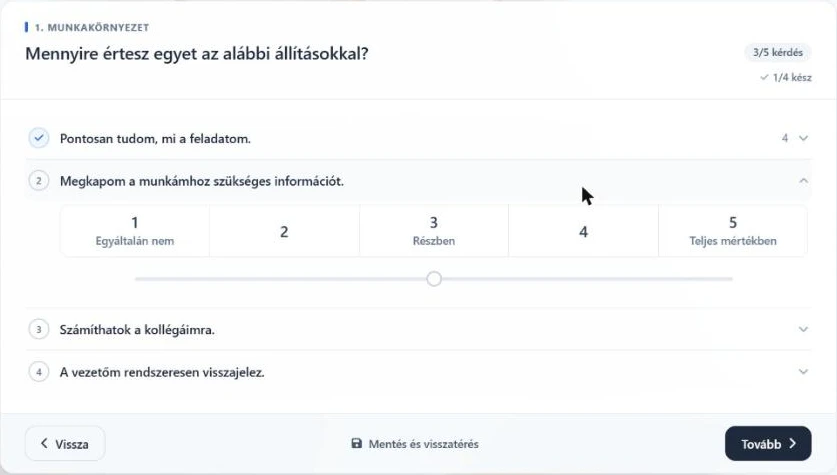
Real onePoll screens from question to result — in the order a survey is built, run and evaluated.
Building
Questions people can answer well.
Release
Who, until when, and who is behind.
Anonymously
With a QR code and a short link, no login.
Responding
Saved step by step, finish later.
Results
Average, distribution, group average — without names.
Real system screens · with test data
Frequently asked questions
What people ask most often about surveys.
What is the difference between a source questionnaire and a survey?
Can it be completed anonymously, without logging in?
Can one person fill in an anonymous survey more than once?
Can anonymous results be broken down by department?
What happens if a survey needs changing after responses have come in?
Who can see the results?
What does Haver do in surveys?
Do we need oneLearning for it?
HR School is oneSolution's strategic partner: offering practical HR support, training, and interim solutions to ensure that system implementation and operations succeed not just technologically, but professionally as well.
Contact
Email address
info@onelearning.infoPostal address
One Learning Zrt.
1021 Budapest, Budakeszi út 51/D, C. ép. II/5