Ask them.
The answers stay here.

Employee surveys, named or anonymous with a QR code — results as averages, distributions and group averages, comparable year on year.

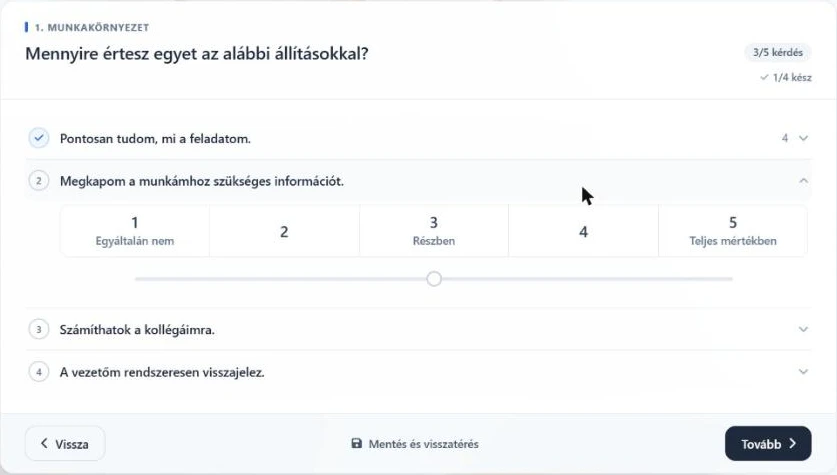
This year and next, the same question.

The same system, in the cloud or on your own servers — still small today, multiple sites tomorrow

How deep shall we go?

Same system. Three depths.

mid-depth. The essentials, with practical examples deep dive. If you want to see what's behind it

The question is not whether you have a survey. It is whether you can compare it next year.

How a survey runs

The questionnaire is built once. The survey runs again every year.

The questions and the survey are two separate things: a source questionnaire holds the questions, and a survey is one release of it. Next year you release a new survey from the same source — so this year's results sit next to last year's.

  1. BuildSingle choice, multiple choice, statements on a scale, rating scale, free text, information block. Questions can be grouped: employees see the group, the statistics calculate a group average.6 question types · 2–10 point scale
  2. ReleaseBy employee, organisational unit or group, with a start date, a deadline and a notification email. Or anonymously: with a short link, a QR code and a printable poster.1 week · 2 weeks · 1 month · 3 months · unlimited
  3. RespondEmployees see on their home page and in their Inbox how long they have. Answers are saved step by step, so a survey can be finished later. Anyone who has not started gets a reminder at the click of a button.not started · started · completed
  4. EvaluateAverages and distributions, a matrix for statements, group averages. Filter by period and by answer (for example, office staff only). Free-text answers appear without names, with a date; export to XLS as well.average · distribution · group average · XLS
What it is for

One survey module for many situations.

Not just the annual survey. The same editor, release and statistics serve every situation where you need to ask.

  • Employee satisfaction Every year from the same source, assigned by name — or genuinely anonymous, with a QR code. This year's result sits next to last year's.
  • During probation Both the new joiner and their manager give feedback in the first months — for example on day 30, 60 and 90. Part of the settling-in plan on get-2.work. Settling in on get-2.work
  • After training An evaluation survey attached to a completed course or one of its groups, scheduled to the end of the course. Each course gets its own copy, so results do not mix. Annual training plan
  • For external contacts, attached to a message For a partner or a prospective customer who is not a user: a personal link in the email, the survey can be completed without logging in, and the answers arrive on behalf of the company. For example, a needs survey before a demo. You can see who opened it and who completed it. If switched on.
  • At onboarding A source questionnaire can also be marked for onboarding: the new joiner gets a survey from it, even before their first working day.
  • Checklist and effectiveness review At one of our customers the same survey also runs as a training checklist and as the effectiveness review of courses.
Anonymously

It can be genuinely anonymous, too.

An anonymous survey is not a named one with the names hidden: nobody logs in, people complete it from a QR code or a short link, and no name, email address or device data is stored with their answers.

Named

  • WhoSelected employees, with a start date and a deadline.
  • WhereOn the home page and in the Inbox, with a notification email.
  • Follow-upYou can see who has not started — they get a reminder.
  • ResultsAggregated; free-text answers appear in the statistics without names.

Anonymous

  • WhoAnyone the link or the QR code reaches — the poster prints on A4.
  • WhereFrom a phone, without logging in.
  • Follow-upNo assignment and no reminders: you see how many responses came in.
  • ResultsPer response, without names.

A survey is either anonymous or named. For a breakdown by department, add a question (“Which area do you work in?”).

The anonymous survey's start page on a phone. QR code masked.
Building

Questions people can answer well.

An answer to a poor question tells you nothing. The editor guides you step by step: type, question, details, classification.

  • Scales of 2–10 points with labels — a scale that works can be saved as a point set, and you can see which questions still use it.
  • Question groups that employees also see, and categories that only group the statistics.
  • Per question: “Other” with free text, a comment field, random order, optional questions.
  • After the first response the structure is locked: typos can be fixed, anything else needs a clone, and earlier responses are kept.
New question: the six question types.

HAVERA poor question shows up before the survey goes out. If switched on, Haver, the built-in helper, flags in the editor a question that asks two things at once or leads the respondent, or a scale end without a label, and suggests labels; in the statistics it sorts free-text answers into themes — the system does the counting. It never blocks saving and makes no decisions.

If you want to go deeper still

What the module actually does: question types, assignment, reminders, anonymous mode, statistics, permissions and scope — on one data sheet.

Take me deeper

Frequently asked questions

What people ask most often about surveys.

What is the difference between a source questionnaire and a survey?
The source questionnaire is the content: questions, answers, scales, groups. A survey is one release of it — you assign employees to it, and the responses collect there. An annual survey needs no new source: you release a new survey from the same one, so results stay comparable year on year.
Can it be completed anonymously, without logging in?
Yes, if you set the survey to anonymous: it gets a short link, a QR code and a printable A4 poster, and it can be completed from a phone without logging in. No name, email address or device data is stored with the answers. A survey is either anonymous or named; in anonymous mode there is no assignment and no reminder, only the number of responses.
Can one person fill in an anonymous survey more than once?
Once per device. This is a soft limit: from another browser or a private window the survey can be filled in again. If respondents need to be tracked individually, a named survey is the right choice.
Can anonymous results be broken down by department?
Yes, if the survey contains a question for it (for example “Which area do you work in?”). In the statistics, the “only those who…” filter narrows results by any answer.
What happens if a survey needs changing after responses have come in?
After the first response the structure is locked: typos can be fixed, but questions cannot be added, deleted or reordered and the scale cannot be changed, because the stored answers and the statistics would be damaged. In that case you make a clone: earlier responses stay with the original, new ones collect in the clone.
Who can see the results?
Whoever you give permission to. Survey permissions have nine separate switches, and the scope can narrow them: with manager scope the statistics show only the responses from the manager's own unit and its sub-units.
What does Haver do in surveys?
If switched on, in the editor it flags a question that asks two things at once, leads the respondent, uses a double negative or has a scale end without a label, and suggests scale labels — it only fills them in when you click Accept. In the statistics it sorts free-text answers into themes once there are 8 of them; the system does the counting, and the full list stays below. It does not write surveys, evaluate results or make decisions.
Do we need oneLearning for it?
No. The surveys module is complete on its own; employees find the survey on their usual home page and in their Inbox. Results can be exported to XLS and printed.

Contact

Add your phone number for a quick callback
How should we contact you?

Email address

info@onelearning.info

Postal address

One Learning Zrt.
1021 Budapest, Budakeszi út 51/D, C. ép. II/5

Related solutions

How do we know everyone is prepared?

oneLearning

  • Upload own materials
  • Videos, PDFs, tests
  • See who is where
  • Course creation with exams
Learn more – oneLearning
How do we know the new colleague has actually settled in?

get-2.work

  • Recruiting and selection
  • Hiring and HR documents
  • Scheduled settling-in plan
  • Feedback during probation
Learn more – get-2.work