In 25 seconds
How a question travels
You build it, release it, people answer, you evaluate. Four steps, in the same system.
A survey does not end when you send it out. The question is whether the answers come back, add up, and can be compared next year.
We don't fit the process to the module. It's the other way round.
In 25 seconds
You build it, release it, people answer, you evaluate. Four steps, in the same system.
How deep shall we go?
Same system. Three depths.
A survey starts working where sending it out ends.
Build
You choose from six question types: single answer, multiple answers, statements on a scale, rating scale, free-text answer, information block.
Release
Per employee or by organisational unit, with a start and a deadline. Or anonymously, with a short link and a QR code.
Answer
From the home page or from a phone. Answers are saved step by step, and the survey can be continued later.
Evaluate
Average and distribution, the statements in one table, group averages with one switch.
Next year you release a new survey from the same set of questions. So this year's result sits next to last year's.
You do not get a list of answers but a picture: what the average is, how the answers are distributed, and which statement stands out.
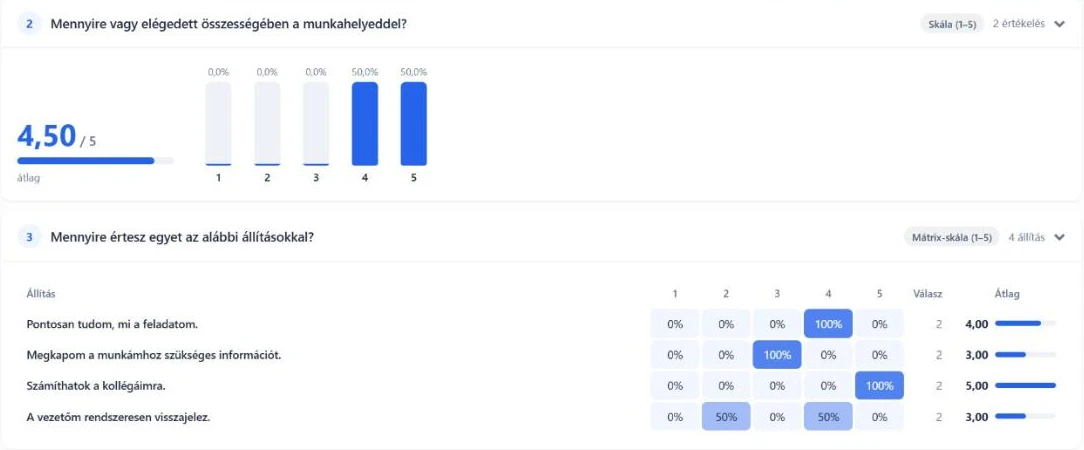
Where the picture is strong and where it is weak — per statement.
Real onePoll screens from question to result — in the order a survey is built, run and evaluated.
Real system screens · with test data
By name
The selected employees get it, with a start and a deadline. You can see who has not started yet, and you send them a reminder with one button.
Anonymously
Whoever the QR code or the link reaches completes it without logging in. No name, email address or device data is stored with their answers.
You decide which one fits which situation.